Monday, November 15, 2010

Mobile Computing


What is mobile computing? What are the challenges of designing for mobile devices and how can we overcome them?

Mobile computing embraces a host of portable technologies that makes internet access on the go not only possible, but integral to everyday life. From notebook computers to personal digital assistants (PDAs) like the Backberry and iPhone, to standard cell phones, mobile computing has become an indispensable way of life (Kayne 2010).  The recent success of the ipad adds yet another dimension to mobile computing with several android and windows powered tablet PCs also hitting the shelves.  All these different devices, now in everyday use make web design a much more difficult task. 
Until recently mobile web design may have been something many designers tried to avoid. Today this is no longer an option. With the amount of mobile devices in use, it soon may not be possible to sell a website without a mobile aspect involved. The slice of the market ignored will be too large for any business.

Browser compatibility, screen resolution and size were always a concern but these difficulties provide a much greater challenge when designing for a host of mobile devices and the different browsers they run. “If you thought that developing sites that work on most web browsers such as IE, Firefox, Chrome, and Safari was tough — try developing one for iPhones, BlackBerrys, Palm Pres, Androids, Motorola devices, Nokia devices, and — the list appears bottomless!”(Dawson 2010). Other difficulties include human interface options such as touch screen and multi touch, limited battery life and possibly slower internet data transfer rates.

To make things even more difficult Steve Jobs and Apple have decided that Flash, “The primary goal of Flash has always been to enable cross-browser, platform and device development”(Brian X. Chen 2010), is no longer necessary on the iphone or ipad. Jobs stated that Flash drains the battery of mobile devices; it’s not very good for multi-touch operation; and its performance, reliability and security are all shoddy”(Schroeder 2010). Many will argue however that Jobs and Apples motives for the move are that “they want to tie developers down to their platform, and restrict their options to make it difficult for developers to target other platforms.”(Brian X. Chen 2010)
  image: www.mmktech.net
Designers typically take two different approaches to try to solve the problem of mobile accessibility. The first is to try to alter an existing standard website, which is designed to be displayed on standard devices so it is viewable on mobile devices. This is usually achieved by altering the CSS (cascading style sheet) and in my opinion is not usually very successful. The second option and in my opinion the best is to provide a totally separate website designed specifically for mobile devices.  By doing this you can provide the user with a fully tailored mobile site without compromising the original one. This is not the only choice the designer has to make however.

The next thing that we need to consider is the structural code (markup and styles) that goes on behind the scenes.
  • Do you go with a mobile-friendly language like WML or the XHTML mobile profiles
  • Do you build an app for iPhones, and then one for the Android?
  • How does the cost and speed associated with mobile device web browsing affect the way you should develop your design?
  • What about modern standards like HTML5 and CSS3?
(Dawson 2010)

As you can see it is not a simple process, and many designers are now solving the problem using a simpler solution, a Content Management Systems (CMS). There are many different CMS’s available the most common ones being Drupal, Joomla and Wordpress. These systems, to varying degrees allow you to build powerful easy to use websites. The beauty of these systems is that there are thousands of plugins which can be used in conjunction with them to modify the site to the user’s needs. Among these plugins are several which can be used to create mobile sites. 

Kuneri Mobile Joomla is one of these pluginds, claiming to be compatible with all phones in the world”  and to “turn your joomla site into a mobile site instantly”(www.mobilejoomla.com 2010).
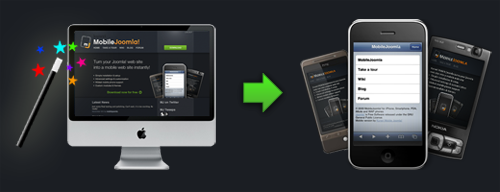
Mobile Joomla! Feature highlights
  • Advanced User Agent detection (multiple methods i.e WURFL, Compact WURFL, fixed or none)
  • Multi site support
  • Advanced image adaptation
  • Flexible layout settings
  • Sub-domain redirection
  • Advanced device categorization: XHTML, iPhone, iMode and WAP
  • Custom templates per device category
  • Menu exclusion per device category
  • Fully customizable with different modules and templates
  • Compatibility with 3rd party extensions, modules and components
(www.mobilejoomla.com 2010)

So although designing for mobile devices is technically a very difficult process, there are tools and applications available to help make the process a less daunting one. And with the excellent products available it is not always necessary for a designer to start from scratch. After all there is no point reinventing the wheel. 


Bibliography
Brian X. Chen, 2010. Adobe Gives Up on Flash for iPhone, iPad | Gadget Lab | Wired.com. Available at: http://www.wired.com/gadgetlab/2010/04/adobe-flash-iphone/ [Accessed November 13, 2010].

Dawson, A., 2010. Mobile Web Design: Best Practices. Available at: http://sixrevisions.com/web-development/mobile-web-design-best-practices/ [Accessed November 13, 2010].

Kayne, R., 2010. What Is Mobile Computing? Available at: http://www.wisegeek.com/what-is-mobile-computing.htm [Accessed November 13, 2010].

Schroeder, S., 2010. Steve Jobs: Flash Is No Longer Necessary. Available at: http://mashable.com/2010/04/29/steve-jobs-flash-is-no-longer-necessary/ [Accessed November 13, 2010].

www.mobilejoomla.com, 2010. Mobile Joomla! for iPhone, Smartphone, PDA, iMode and WAP phones. Available at: http://www.mobilejoomla.com/ [Accessed November 15, 2010].

Thursday, October 28, 2010

Voice and Video Convergence

What is voice and video convergence? Why is it currently utilized more in the business world? And will video calling succeed at a consumer level in the future?
Voice and Video convergence has made a huge impact on business users over the last few years. Before convergence, separate data (IP Network), voice (Local PBX and PSTN connection) and video (ISDN/PSTN) networks where required to allow communications between companies. These were expensive to implement (separate cabling infrastructure) and difficult to support as the different technologies traditionally required a different support team i.e. IP for the Data network and PBX engineers for the voice and possibly a mixture of both for the video. Now, that all devices have become IP, there are a few major benefits:

  • An immediate saving on cabling as only a CAT 6 cabling infrastructure is needed for all devices.
  • If they already have a WAN infrastructure between their offices, they can now make free calls across that instead of paying a normal phone call charge for each call. Also, they can implement least cost routing between sites i.e. a call from the Dublin office to a London number can go across the companies WAN and break out at the London office so they only pay for a local call
  • Large residential broadband bandwidths mean that companies can extend the offices services (email, IP phone, Web Cam and instant messaging client) to employees at home. If users can now work as effectively from home as from the office then they can be made permanently a remote user which has huge all-round benefits:
  1. Smaller Office spaces required
  2. Reduced light and heat bills saves money and is more energy efficient
  3. Less traffic on roads with people travelling to work means less pollution
  4. No travel time to and from work gives employees more time to themselves and reduces stress
  • Having all these devices on the IP network makes it much easier to integrate them together so that one application or client can be your email, IM, virtual IP phone and video conferencing point.

Cisco are the current market leaders in providing IP network solutions to the corporate sector (wikinvest.com 2010) with their Business Video, TelePresence and Unified Communications products.
On a consumer level, where the possibility of spending large sums of money on specialised hardware and software is not so viable the combined use of voice and video has been slower to take hold. Products such as skype have brought video calling to the consumer to a certain degree. Simple to use free software and the possibility to make free or cheap video calls has proven to be a winning combination. However video calling is still only used for a tiny fraction of calls at consumer level

Hardware limitations may be a small part of the problem, but smart phones have had the functionality to make video calls for years. New products such as IP Television, the Panasonic VIERA Cast™ IPTV for example, which allow Skype on Your TV will also encourage average users to move towards video calling (Parkes 2010). The Videophone Touch AiGuru SV1T for Skype from ASUS also removes the need for a separate pc microphone and speakers (Humphries 2010).

One of the main reason video calling has not taken off, as stated by David Sims, TMCnet Contributing Editor “We usually don’t want the other person to see us, what we’re wearing -- or not wearing” may be a more difficult one to overcome (Sims 2010). The privacy afforded by keeping calls to voice only is something people may not sacrifice easily. The ability to answer a call and say were at home while were actually in the pub watching football is no longer available when a video call is used.

In my opinion however the single biggest driver behind the future success of consumer video calling may be the recently released iphone 4. Face Time Calls are one of the major features being pushed by Apple for this iphone release(apple.com 2010). The technology used may be nothing that hasn’t been seen before. Sceptics of the system criticise the ability of Face Time to only work when a wifi connection is available. This however may increase the chances of video calling thriving in the future. The quality of the video over wifi connection will be far superior showing users its full potential and it does not use up carrier minutes, which is always a bonus.


Apples marketing ability coupled with their market saturation has the potential to make video calling more socially viable and acceptable. Apples ease of use “it just works” will also bring video calling to the less technically savvy. And most importantly once the ball starts rolling millions of iphone 4 owners worldwide will start to use Face Time Calls. This will most lightly be followed by all the other major smart phone companies, who constantly try to produce “iphone beaters” following suit.

With all of these aspects considered I feel that while video calls will never completely replace voice only calls, in the future a much higher percentage of average consumer correspondence will involve voice and video convergence.


Bibliography

apple.com, 2010. Apple - iPhone 4 - One-tap video calling with FaceTime on iPhone 4. Available at: http://www.apple.com/iphone/features/facetime.html [Accessed November 11, 2010].

Humphries, M., 2010. Asus release Videophone Touch AiGuru SV1T for Skype – Computer Chips & Hardware Technology | Geek.com. Available at: http://www.geek.com/articles/chips/asus-release-videophone-touch-aiguru-sv1t-for-skype-20090921/ [Accessed November 11, 2010].

Parkes, P., 2010. Skype - The Big Blog - Get Skype on your TV. Available at: http://blogs.skype.com/en/2010/01/skype_on_your_tv.html [Accessed November 11, 2010].

Sims, D., 2010. Will Video Calls Finally Take Off? Available at: http://unified-communications.tmcnet.com/topics/unified-communications/articles/111649-will-video-calls-finally-take-off.htm [Accessed November 11, 2010].

wikinvest.com, 2010. Stock:Cisco Systems (CSCO). Available at: http://www.wikinvest.com/stock/Cisco_Systems_(CSCO) [Accessed November 11, 2010].

Thursday, October 7, 2010

Cloud Computing


Will most of the daily tasks currently preformed locally by the average user move to the cloud?

Some everyday tasks have already made the shift. The most obvious of these is email. For many years now people have been moving away from traditional email to the likes of Gmail. Increasingly products such as Google Docs are also becoming more popular. We have been moving towards the cloud without even realising it for a number of years. Now that the corporate world can see the great potential for profit and start to advertise cloud products such as Amazons EC2 and VMware's multiple services, cloud computing is the biggest buzz word in town.  The paradigm shift to the cloud until recently, was a slow and natural progression to utilise new and improved network technology. It is now being pushed forward and may be about to go to the next level.


Chrome OS from Google is currently in beta. CLOUD from Good OS is currently in private beta and pre installed on the Gigabite M912 Touch Screen Netbook. These are just two of the many operating systems set to hit the mainstream that are 100% cloud orientated. They essentially allow the machine they are installed on to function solely as a browser. One of the main competitors for Googles Chrome OS is Jolicloud, produced by a French company it is another cloud centred OS, however it also allows files and programs to be stored and installed locally. Easy access to cloud based products such as drop box are built into the operating system


For these operating systems to be viable it is not hard to imagine the majority of every day computing tasks moving to the cloud. If they don’t these products are worthless.  A quick scan through some of the 700 plus apps available for Jolicloud shows how far we have come already.  Cloud video and photo editing apps, although basic are available alongside cloud word processing and publishing apps.

Several products have recently been developed to let you create a desktop environment that runs in the browser. Confusingly these are also called Cloud Operating Systems. They are not operating systems in the traditional sense, ie they do not run on or control your computer hardware. Hosted on a cloud service, all the application processing happens in the cloud making data more accessible from
mobile phones tablets and netbooks. Glide OS is one of the leaders offering 30gig free storage, and a suite of software including word processing, presentation, email, photo and media products.


The advantage of being able to access all of your data anywhere from any machine makes the cross over to cloud computing more attractive. The elasticity of the cloud, ie the need to only pay for storage, processing capacity and software as we need and use it is another very positive factor.

On the down side a certain amount of control is lost to the cloud, how safe or private is our data? One of the major stumbling blocks for cloud computing, especially relevant in Ireland is the quality of our internet connections. Without fast always on access the cloud is a non runner. As John Burdette of Sun Microsystems stated “The network is the computer”.

I feel that eventually the majority of the average user’s everyday tasks will move to the cloud. Rapid growth in the sector spurred on by the corporate dollar may change what was a natural progression to utilise improved network technology. It may now in fact push network technology to improve and expand even faster as people demand a better service to fuel the cloud.


References

http://www.thenetworkisthecomputer.com/
http://www.linux.com/news/embedded-mobile/netbooks/308465:five-best-linux-netbook-oses-for-now
http://techcrunch.com/2010/03/04/jolicloud-chrome/
http://www.taranfx.com/free-cloud-os-gdrive
http://d6.allthingsd.com/20080529/transmedia/
http://www.speedtest.net/global.phphttp://www.glidedigital.com/
http://www.infoworld.com/d/cloud-computing/what-cloud-computing-really-means-031 http://www.dropbox.com/
http://www.jolicloud.com/
http://www.thinkgos.com/
http://www.chromium.org/chromium-os
http://www.vmware.com/solutions/cloud-computing/
http://aws.amazon.com/ec2/


Tuesday, September 21, 2010

Ronan Mc Manus

Ronan Mc Manus G00238689


Bachelor Of Science Degree (Honours) In IT For Business


Technology and Media Convergence Blog